#include <set>
#include <map>
#include <list>
#include <cmath>
#include <ctime>
#include <deque>
#include <queue>
#include <stack>
#include <cctype>
#include <cstdio>
#include <string>
#include <vector>
#include <cassert>
#include <cstdlib>
#include <cstring>
#include <sstream>
#include <iostream>
#include <algorithm>
#include <climits>
#include <clocale>


using namespace std;


typedef long long lint;

bool cmp(pair<lint,lint> a, pair<lint,lint> b) {

  return (a.first<b.first);

}


bool check(lint n) {

  bool ver[20];
  char buf[100];
  lint len;
  for (int i=0 ; i<=20 ; i++) ver[i]=false;

  sprintf(buf,"%lld",n);

  len = strlen(buf);

  if (len>10) return false;

  for (int i=0 ; i<len ; i++) {
 if ( ver[ buf[i]-'0' ] == true ) return false;
 else ver[ buf[i]-'0' ] = true;
  }
  return true;
}


int main( void ) {

  lint kase, n, i, j, numerator, x, k;
  bool first=true, dis, ver[10];

  vector< pair<lint,lint> > lst;

  scanf("%lld",&kase);

  while (kase--) {

 scanf("%lld",&n);

 if (n==0) continue;

 lst.clear();

 for (i=1 ; (n*i)>=0 ; i++) {

   numerator = n*i;

   x = numerator;

   for (k=0 ; x ; k++, x/=10) if (k>10) break; // if length of the current
   if (k>10) { break; }       // numerator exceeds 10 the loop ends

   if (check(i) && check(numerator))
  lst.push_back(make_pair(numerator,i));

 }

 sort(lst.begin(),lst.end(),cmp);

 if (!first) putchar('\n');
 first = false;
 for (i=0 ; i<lst.size() ; i++) {
   printf("%lld / %lld = %lld\n",lst[i].first,lst[i].second,n);
 }

  }

  return 0;

}
Wednesday, May 30, 2012
[UVa] 471 - Magic Numbers

Tuesday, May 29, 2012
[C++] Bellman Ford Implementation
Bellman-Ford is a Single Source Shortest Path (SSSP) detection algorithm. I implemented this one using a new kind of approach to coding (new for me). I used a nested class implementation. The whole BFord algorithm is packed with it's data structure in an object. The edges are also implemented using an internal class in the object. I never did nested class before this. Looks awesome.
#include <cstdio>
#include <vector>

#define INF (1<<31 - 1)
#define NIL -1

using namespace std;

class bford {

public:

  class edge {
  public:
 int u, v, w;
  };

  int nVertex;
  int *d, *p;
  vector<edge> elist;

  bford( ) {
 d = new int[0];
 p = new int[0];
 elist.clear();
  }

  bool function( int s, int nVertex ) {

 d = new int[(const int)nVertex+1];
 p = new int[(const int)nVertex+1];

 int i, j, w, u, v;
 // init_single_source( s ) {
 for (i=0 ; i<=nVertex ; i++) {
  d[i] = INF;
  p[i] = NIL;
 }
 d[s] = 0;
 // }

 for (i=0 ; i<nVertex-1 ; i++) {
  for ( j=0 ; j<elist.size() ; j++) {
   // relax( elist[j].u, elist[j].v, elist[j].w ) {
   u = elist[j].u;
   v = elist[j].v;
   w = elist[j].w;

   if (d[v] > d[u]+w) {
    d[v] = d[u]+w;
    p[v] = u;
   }
   // }
  }
 }

 for (i=0 ; i<elist.size() ; i++) {
  if ( d[ elist[i].v ] > d[ elist[i].u ] + elist[i].w ) {
   return false;
  }
 }
 return true;
  }

};

int main( void ) {

  int i, u, v, w, nVertex, nEdge;

  bford grp;
  scanf("%d",&nVertex);

  scanf("%d",&nEdge);

  for (i=0 ; i<nEdge ; i++) {
 scanf("%d %d %d",&u,&v,&w);
 grp.elist.push_back(bford::edge{u,v,w});
  }

  printf("%s\n",(grp.function( 1, nVertex )?"True":"False"));

  for (i=1 ; i<=nVertex ; i++) {
 printf("%d - %d\n",i, grp.d[i]);
  }


  return 0;

}
Thursday, May 24, 2012
[UVa] 627 - The Net
Pretty simple and somewhat forced towards the solution.
Counting number of nodes and shortest path. You have to print the path too.
It's simply BFS. The pi[ ] array comes handy to print the path.
Method: BFS (Use the pi array)
Counting number of nodes and shortest path. You have to print the path too.
It's simply BFS. The pi[ ] array comes handy to print the path.
Method: BFS (Use the pi array)
#include <cstdio>
#include <cmath>
#include <cstdlib>
#include <cstring>
#include <queue>
#include <algorithm>

#define WHITE 0
#define GREY 1
#define BLACK 3
#define INF 0
#define NIL -1

using namespace std;

bool color[400], adj[400][400];
int d[400], p[400];
char in[100000];

bool bfs( int s, int des, int n ) {
 int u, v;
 for (u=0 ; u<=300 ; u++) {
  color[u] = WHITE;
  d[u] = INF;
  p[u] = NIL;
 }
 color[s] = GREY;
 d[s] = 0;
 p[s] = NIL;

 queue<int> q;
 q.push(s);
 while (!q.empty()) {
  u = q.front();
  q.pop();
  for (v=1 ; v<=n ; v++) {
   if (adj[u][v] && color[v]==WHITE) {
    color[v] = GREY;
    d[v] = d[u]+1;
    p[v] = u;
    q.push(v);
    if (v == des) {
     return true;

    }
   }
  }
  color[u] = BLACK;
 }
 return false;
}

void print_path(int v) {
 int i, j, pr[1000];
 for (i=v, j=0 ; i>0 ; i=p[i], j++) pr[j] = i;
 for (--j ; j>0 ; j--) printf("%d ",pr[j]);
 printf("%d\n",pr[j]);  //|Last one can't have
}    //|can't have blank space
    //|after it

int main( void ) {


 int i, j, c, n, u, v, nodes, conn;
 char *p;

 while ( scanf("%d",&nodes) == 1 ) {
  getchar(); // Back off for gets()

  for (i=0 ; i<=300 ; i++) {
   for (j=0 ; j<=300 ; j++) adj[i][j] = false;
  }

  n = nodes;

  while (nodes--) {
   gets(in);
   p = strtok(in,"-,");
   sscanf(p,"%d",&i);
   p = strtok(NULL,"-,");
   while (p) {
    sscanf(p,"%d",&c);
    adj[i][c] = true; //|Connections are !bidirectional
    p = strtok(NULL,"-,");
   }
  }


  scanf("%d",&conn);

  printf("-----\n");

  for (i=1 ; i<=conn ; i++) {
   scanf("%d %d",&u, &v);
   if (bfs(u,v,n)) {
    print_path( v );
   } else {
    printf("connection impossible\n");
   }
  }
 }
}
Sunday, May 20, 2012
Setup Code::Blocks Nightly on Windows
Install MinGW GCC Port on Windows.
1. Just go to this address [ http://sourceforge.net/projects/mingw/files/Installer/mingw-get-inst/ ]
2. Select the topmost link that looks (almost) like mingw-get-inst-XXXXXXXX
3. Download the exe you see there and execute it on your machine keeping the Internet connected. Everything else is pretty self explanatory.1. Just go to this address [ http://sourceforge.net/projects/mingw/files/Installer/mingw-get-inst/ ]
2. Select the topmost link that looks (almost) like mingw-get-inst-XXXXXXXX
Now for the nightlies of Code::Blocks.
1. Go to [ http://forums.codeblocks.org/ ]
2. Look for the section called Nightly Builds, go into it.
3. The latest nightly is the first one, click it.
4. Every nightly release has 3 links. Links to the 2 DLLs and the zip file containing the release. Download all of them (unless you've done this before and know exactly what you can ignore here).
5. Extract all of them in the same directory. If they are in folders bring them out.
6. If the extraction went well, executing codeblocks.exe won't be any problem.
7. After codeblocks.exe opens, Open this section Settings > Compiler. If you can't find it, look at the top row of options in the Code::Blocks window.
8. In the Window that opens you'll see some tabs slightly after the first options. Click on the fourth one called Toolchain Executables.
9. Look for the button called "Auto Detect". Click it. If it reports success then you're done. Otherwise click on "..." that is to the left of "Auto-Detect" and browse to the folder where you've installed MInGW.
I hope everything went well. To check if your compiler is working fine just compile a "Hello World" program. :D Any questions are welcome.
Friday, May 18, 2012
[UVa] 12032 - The Monkey and the Oiled Bamboo
A very simple problem but the conditions have to be understood very carefully.
Method: Simple, on the fly.
Method: Simple, on the fly.
Initialize the value of k with the first jump (from ground to first rung)
If (jump == capacity)
    capacity decreases by 1
If (jump > current capacity)
    Check if jump == k, increase k by 1. Reset capacity to k
    Check if jump > k, set k = jump, Reset capacity to k-1
    Check if jump < k increase k by 1. Reset capacity to k
#include <stdio.h>

typedef int lint;


lint val[100000 + 10];

int main( void ) {

 lint n, i, k, v, kase=1, kounter;

 val[0]=0;

 scanf("%d",&kounter);

 while (kounter--) {
  scanf("%d",&n);

  for (i=1 ; i<=n ; i++) {
   scanf("%d",&val[i]);
  }

  k = val[1];
  v = val[1];

  for (i=0 ; i<n ; i++) {
   if (val[i+1]-val[i]>v) {
    if (val[i+1]-val[i]==k) {
     k++;
     v=k;
    } else if (val[i+1]-val[i]>k) {
     k=val[i+1]-val[i];
     v=k-1;
    } else {
     k++;
     v=k;
    }
   } else if (val[i+1]-val[i]==v) {
    v--;
   }

  }
  printf("Case %d: %d\n",kase++,k);

 }
 return 0;
}
Thursday, May 17, 2012
How to use UVa Online Judge
Many of us have enormous interest in practicing programming using online judge sites but sometimes get stuck when it comes to using them. In this tutorial, I've tried to explain the usage of one of the most popular OJ sites, The UVa Online Judge.
Let's get started.
First of all get an account.
1. Go to http://uva.onlinejudge.org
2. On the panel situated on the left side of the page look for the link "Register"
 3. Click that you'll reach a page where you have to supply some account information in order to get registered. Look carefully at the last field, put 00000 in it.
 4. After you've confirmed your email address and all other formalities you can come back and Log in to your account. Do so using the panel on the left.
5. Now for a test drive, let's submit a code. First go to "Browse Problems" on the left panel slightly to the bottom.
 6. Here comes a list of Categories that the problems are organized in. We will browse through the volumes of Contest Problems. These sets are organized according to Contests. We use this because after a contest finishes, we get the problems of that contest in here together easily.
 7. Click the volume you desire to use, I open the last one because this set has the latest contest problems.
 8. We're going to submit a code for the problem "Calculating Yuan Fen". I'm not going to explain it here since that's not what I'm trying to show you.
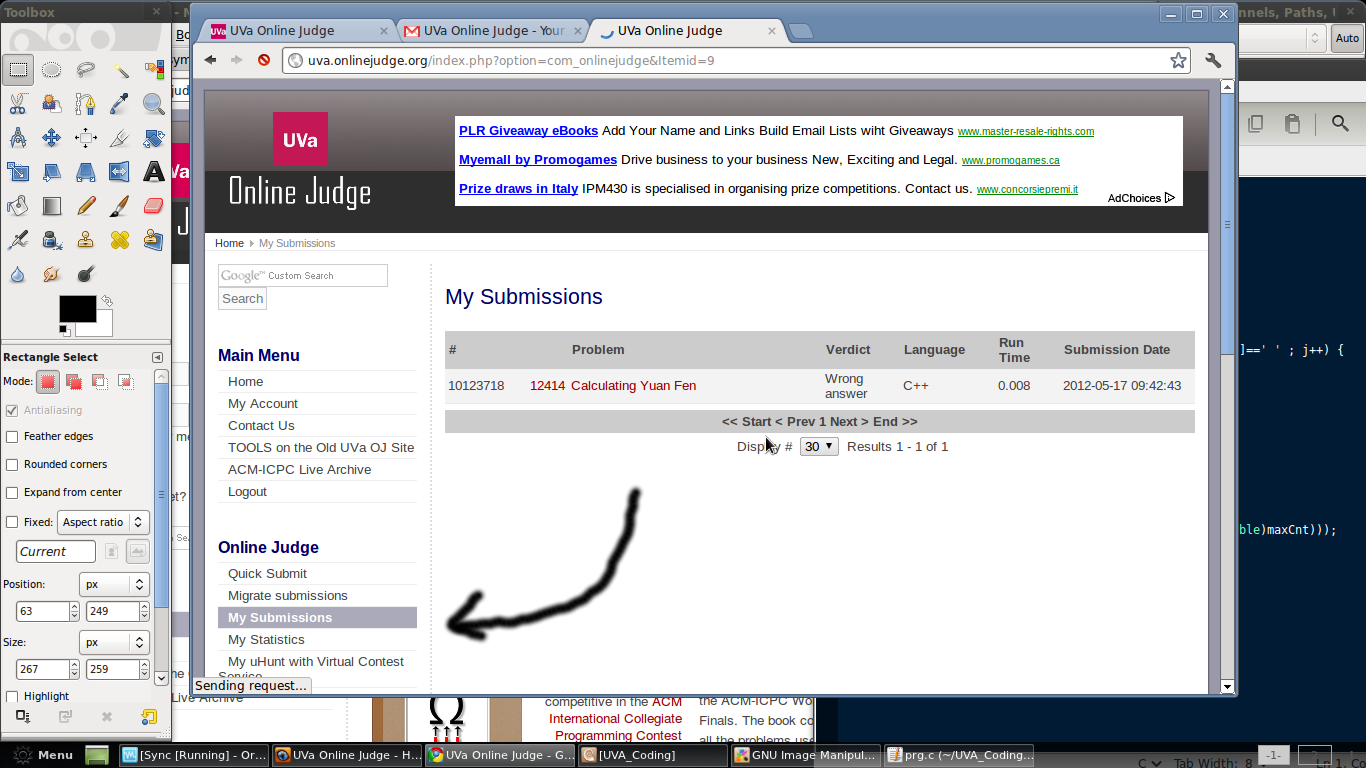
 9. Look on the left side of the problem name, it's the code of the problem, 12414. If you submit a solution, you need this code. You can also click on the problem and use the "Submit" button inside. Since I use the Quick Submit method a lot, I'm showing you that. On the left side look for the link "Quick Submit"
 10. The Quick Submit window is pretty easy to understand.
a. Put the problem code in the first field
b. Choose which language you're coding in (The language you used to write the solution)
c. Paste your code in the BIG code field or you can choose the code file itself.
d. Click on "Submit"

 11. After the submission is complete you'll have to click on the "My Submissions" link on the left side to see if the solution was successfully submitted and if so, was it Accepted or not. Since I didn't post an actual working solution, I got Wrong Answer. Hope that won't be the same with you :)

That's it, the basics. Start exploring the site and examining the different sections. You'll soon find that it's an awesome experience. Solving problems using programming methods is something only a few lucky people get to enjoy. And congratulations, you're now one of them :D
UVa is not the end. There are much better (resourcefully) sites that can help you enhance your programming skills. I showed UVa because most people start here. I don't think you'll need to understand anymore to start on other sites. Only TopCoder might seem a bit tricky initially. If you need any help, comment here or contact me on Facebook. Happy Coding.
Let's get started.
First of all get an account.
1. Go to http://uva.onlinejudge.org
2. On the panel situated on the left side of the page look for the link "Register"


5. Now for a test drive, let's submit a code. First go to "Browse Problems" on the left panel slightly to the bottom.


a. Put the problem code in the first field
b. Choose which language you're coding in (The language you used to write the solution)
c. Paste your code in the BIG code field or you can choose the code file itself.
d. Click on "Submit"


That's it, the basics. Start exploring the site and examining the different sections. You'll soon find that it's an awesome experience. Solving problems using programming methods is something only a few lucky people get to enjoy. And congratulations, you're now one of them :D
UVa is not the end. There are much better (resourcefully) sites that can help you enhance your programming skills. I showed UVa because most people start here. I don't think you'll need to understand anymore to start on other sites. Only TopCoder might seem a bit tricky initially. If you need any help, comment here or contact me on Facebook. Happy Coding.
[UVa] 12414 - Calculating Yuan Fen
#include <stdio.h>

int y(char *s, int st) {
 int val[100], stor[100], v, i, j, k=0;
 for (i=0 ; s[i] ; i++) {
  v = s[i]+st-'A';
  for (j=0 ; v ; j++, v/=10) {
   stor[j] = v%10;
  }
  for (--j ; j>=0 ; j--, k++) {
   val[k] = stor[j];

  }
 }


 while (k>2) {
  for (i=0, j=0 ; j<k ; j++, i++) {
   val[i] = (val[j]+val[j+1])%10;
  }
  if (k==4) {
   if (val[0]==1 && val[1]==0 && val[2]==0) {
    return 100;
   }
  }
  k--;
 }
 return 0;
}

int main( void ) {
 char input[20];
 int i, found, result;
 while ( gets(input) ) {

  for (i=1, found=0 ; i<=10000 && found==0 ; i++) {
   result = y(input, i);
   if (result == 100) {
    found = 1;
   }
  }
  if (found == 1) {
   printf("%d\n",i-1);
  } else {
   printf(":(\n");
  }
 }
 return 0;
}
Subscribe to:
Posts (Atom)
Connect Rapoo MT750S with Linux (Tested on Manjaro)
I bought this obvious copy of MX Master 2S in hopes of having the device switching functionality along with a lightweight body because I ha...

-
 I like coding a lot, keeps me glued to the PC for hours. For that reason it's a need to edit the Syntax Highlighter to suit my eyes for...
 -
I've been constantly switching between my two OSs, Win7 and Linux Mint for just flashing a ROM to my Xperia device. And ofcourse, I hat...
-
Method: The problem at first glance seems too straightforward but it's not that much. Think a bit about the lines "Erin can add ...